
Dataset#
Every recording comes from the IBL Brain Wide Map [IBL et al., 2025], a brain-wide survey of Neuropixels activity recorded while mice perform one standardized decision task across ten laboratories.
The dataset varies along two axes. All files are stored in brainsets HDF5 format.
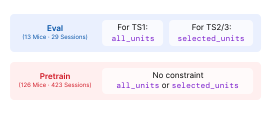
Regime splits the sessions into two disjoint sets:
pretrain: the larger set of sessions, available for learning general representations, listed in
src/core/data/pretrain_recording_ids.txt.eval: the sessions that determine benchmark numbers for TS1, TS2, and TS3, listed in
src/ibl_bwb_eval/data/eval_recording_ids.txt.
Build is the units quality filtering baked in the dataset at processing time.
all_units: no filtering. TS1 reports on this build.
selected_units: quality filters applied. TS2 and TS3 require it.
Quick start#
Download everything with the AWS CLI:
aws s3 sync s3://brain-wide-bench/brainsets/ ./data/ --no-sign-request
which lands as:
data/
├── all_units/ibl_brain_wide_bench_2026/
│             ├── eval/
│             │   ├── 0802ced5-33a3-405e-8336-b65ebc5cb07c.h5
│             │   └── ...       # 29 sessions in total
│             └── pretrain/
│                 └── ...       # 423 sessions in total
└── selected_units/ibl_brain_wide_bench_2026/
                   ├── eval/
                   │   └── ...  # the same 29 sessions, fewer units
                   └── pretrain/
                       └── ...  # the same 423 sessions, fewer units
then point the code at it with one .env line per build: see
Setting the data root.
Everything below is the detail: how the builds differ and how to fetch less than all of it.
Why two builds#
TS2 and TS3 predict quantities attached to individual units: TS2 reconstructs a held-out neuron’s spiking activity, and TS3 classifies a unit’s brain region from its activity. A poorly isolated unit is then a corrupted target or label, not just a noisy input, so both suites need units that passed quality control (QC). TS1 decodes behavior from the whole population, where each unit is only an input feature and filtering discards signal.
Which filters ran is therefore the critical difference between builds. They are
applied before spike data is saved, so they are baked into the .h5 files and
cannot be changed after the fact without reprocessing.
Filter |
Effect |
|---|---|
|
Keeps only probes with a passing probe QC label. Applied to eval sessions only; pretrain sessions keep all probes. For reference, 53% of pretrain probes carry a passing label, against 82% of eval probes. |
|
Keeps only units with mean firing rate above 1.0 Hz. |
|
Keeps only units with a QC label of 1.0 (good units). |
TS1 evaluates decoding from the full unfiltered population: use
all_units. Every reported TS1 baseline uses that build. A filtered build
still runs; report the build with your results so the difference in setting is
clear.
TS2 and TS3 require quality-filtered units for valid evaluation: use
selected_units.
Pretraining has no requirements. Models may be pretrained on any data source, with any unit filtering, split strategy, or supervision signal. This is intentional, as the pretrain set is meant to support a wide range of research questions, from studying the effect of scale and curriculum, to exploring different QC and filtering strategies, to designing custom training objectives for neural representation learning.
The filters define the population a build stores. Task suites may narrow it
further at load time, so selected_units is not the same thing as the
population TS3 scores on: see Two layers of unit QC.
Variable context#
Every dataset built on IBLBrainWideBench2026 accepts a
context_length: the total sampled window, in seconds, bounded by
MAX_CONTEXT_LENGTH (20.0, matching the guaranteed gap between splits, so a
longer window can never reach into a neighboring split’s data). It defaults to
1.0 and is stored on the instance as context_window.
Only IBLBrainWideBenchTS1 and
IBLBrainWideBenchTS2 make it configurable: each has a
fixed, trailing window that never moves regardless of context_length, and
context_length is how much extra history precedes it. For TS1 and TS2
co_smoothing, that window (TARGET_WINDOW, COSMOOTH_TARGET_WINDOW,
1.0s) is exactly what gets scored. TS2 forecasting scores a smaller, fixed
slice of it instead, FORECAST_RATIO of FORECAST_BASE_WINDOW (0.1s), so
it stays a forecast, observed history predicting a future, rather than growing
to cover the whole trailing second as context_length varies.
get_sampling_intervals is unaffected by any of this: the eval set, which
trials exist and what gets scored, is the same regardless of
context_length. The extra history is added per sample, extending the
window backward and clipping to whatever is actually available near a
recording or split boundary, so a submission never loses a trial to a longer
context request.
Every other dataset (pretraining, TS3) just carries the inert default: nothing about it changes, and nothing needs to. A model that wants its own configurable window can still route it through the same parameter at construction time, even outside TS1/TS2; NuCLR’s pretraining trainer does exactly this, see Which dataset class should I use?.
Writing a model that consumes it#
A model reads the configured window size off train_dataset.context_window in
link_datasets(). Sizing whatever processes the
input to it is always correct, since the data handed back genuinely spans that
many seconds. The part that is easy to get wrong is the readout: a dense,
per-input-timestep prediction, one value per position in a grid the size of the
input, silently stops matching the target the moment context_length grows
past TARGET_WINDOW, since the target only ever covers the trailing scored
window.
Two patterns already in this codebase avoid that:
Query the target’s own timestamps. POYO, POYO+ and POSSM place their output queries at
target["timestamps"], which is always restricted toTARGET_WINDOWregardless of how much context precedes it, so the model never predicts more than the target covers.Fix the output dimension. RRR’s readout dimension is
readout_spec.num_timesteps, a constant derived fromTARGET_WINDOW, never from the input length.
A model that does neither, sizing its readout to the full input length, only
works at the default context_length. Several baseline models are exactly
this case, and their link_datasets carries a comment saying so: an explicit,
permanent limitation, not an oversight to eventually fix generically. Extending
one of them to consume more context means changing the readout, not the
dataset.
Downloading from S3#
The bucket is laid out as brainsets/<build>/ibl_brain_wide_bench_2026/<regime>/,
so adding path components to the source narrows what you download. It is publicly
readable; --no-sign-request avoids the need for AWS credentials. The quick
start above takes all of it; each step below takes less.
One build, both regimes:
# unfiltered, for TS1
aws s3 sync s3://brain-wide-bench/brainsets/all_units/ ./data/all_units --no-sign-request

# quality-filtered, for TS2 and TS3
aws s3 sync s3://brain-wide-bench/brainsets/selected_units/ ./data/selected_units --no-sign-request
One build and one regime, shown for
all_units, swap the name for the other build:
# the 29 benchmark sessions
aws s3 sync s3://brain-wide-bench/brainsets/all_units/ibl_brain_wide_bench_2026/eval/ \
    ./data/all_units/ibl_brain_wide_bench_2026/eval --no-sign-request

# the 423 pretraining sessions
aws s3 sync s3://brain-wide-bench/brainsets/all_units/ibl_brain_wide_bench_2026/pretrain/ \
    ./data/all_units/ibl_brain_wide_bench_2026/pretrain --no-sign-request
One session, using a <session_id> listed in
src/core/data/<regime>_recording_ids.txt:
aws s3 cp s3://brain-wide-bench/brainsets/<build>/ibl_brain_wide_bench_2026/<regime>/<session_id>.h5 \
    ./data/<build>/ibl_brain_wide_bench_2026/<regime>/ --no-sign-request

# for example, the first eval session of the all_units build
aws s3 cp s3://brain-wide-bench/brainsets/all_units/ibl_brain_wide_bench_2026/eval/0802ced5-33a3-405e-8336-b65ebc5cb07c.h5 \
    ./data/all_units/ibl_brain_wide_bench_2026/eval/ --no-sign-request
Whatever you narrow to, the destination has to end in the same
<build>/ibl_brain_wide_bench_2026/<regime> path the source does, since that
is the layout the loader expects.
LFP recordings#
LFP is shipped separately from the spikes/behavior brainsets above, as
lfpack-compressed traces (int-brain-lab/lfpack, mild tier: ~270x compression,
~15µV median RMSE). Unlike the .h5 files above, LFP is keyed by probe
insertion (pid), not by session, since a session can carry more than one
probe:
aws s3 cp s3://brain-wide-bench/brainsets/lfp/ibl_brain_wide_bench_2026/<pid>.h5 \
    ./data/lfp/ibl_brain_wide_bench_2026/ --no-sign-request
There is no <build>/<regime> split for LFP: it does not depend on unit
filtering, and the same file serves both pretrain and eval. Coverage matches
the session cohort above (688 of the archive’s 1099 recordings fall within
pretrain_recording_ids.txt/eval_recording_ids.txt; the rest belong to
sessions outside brain-wide-bench and are not shipped).
To find the pid\(s) for a given session, read the probes group of that
session’s own .h5 file (its id field lists the session’s probe
insertion ids). Decode a shipped file with lfpack.LFPackReader.
Custom builds#
The two builds on S3 are not the only ones you can have. Reprocessing the sessions from raw data with the brainsets CLI lets you pick the filters yourself.
# all_units, for TS1 (no unit filters)
brainsets prepare ./ibl_brain_wide_bench_2026 --local \
    --processed-dir ./data/all_units

# selected_units, for TS2 and TS3 (all quality filters)
brainsets prepare ./ibl_brain_wide_bench_2026 --local \
    --processed-dir ./data/selected_units \
    --unit-filter all

# a custom build, here firing rate only
brainsets prepare ./ibl_brain_wide_bench_2026 --local \
    --processed-dir ./data/custom \
    --unit-filter firing_rate
--unit-filter all expands to the full set required by TS2 and TS3, and the
individual names (firing_rate, probe_qc, unit_qc) can be combined
freely. Any combination other than those two is recorded as a custom build,
which TS1 accepts with a warning and TS2 and TS3 refuse.
See ibl_brain_wide_bench_2026/README.md for the full list of pipeline
flags and options.