
Task Suite 1: Behavior Prediction#
TS1 evaluates supervised decoding of behavioral variables from neural population activity.
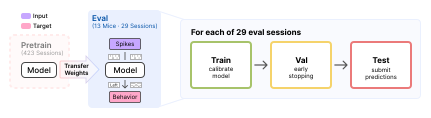
Overview of TS1#
Eight tasks are included: 5 timestep-level regression tasks (licking rate, whisker motion energy, wheel speed, left/right paw speed) and 3 sequence-level classification tasks (stimulus contrast, choice, reward). Each task expects readouts over a 1 second target window, but context can come from up to 19 seconds prior to the target window.
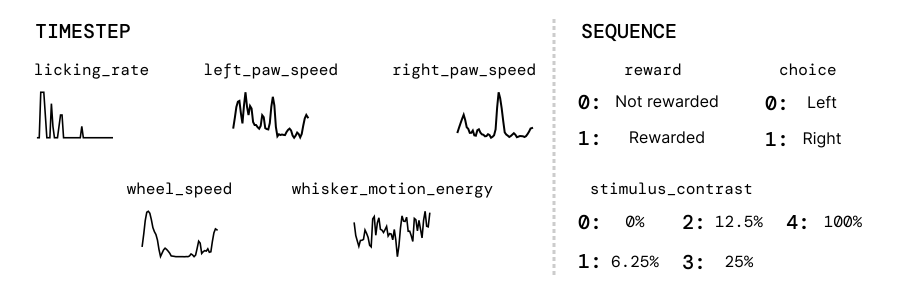
TS1 suite: timestep-level (left) and sequence-level (right) behavior decoding targets.#
The tasks are summarized in the table below, including their primary metrics for the benchmark, and visualized in the figure above.
Task |
Variable type |
Resolution |
Target as served |
Primary metric |
|---|---|---|---|---|
|
Regression |
Timestep |
z-scored |
\(R^2\) |
|
Regression |
Timestep |
raw |
\(R^2\) |
|
Regression |
Timestep |
z-scored |
\(R^2\) |
|
Regression |
Timestep |
z-scored |
\(R^2\) |
|
Regression (rate) |
Timestep |
counts per bin |
Poisson \(D^2\) |
|
5-way multiclass classification |
Sequence |
/ |
Balanced acc. |
|
Binary classification |
Sequence |
/ |
Balanced acc. |
|
Binary classification |
Sequence |
/ |
Balanced acc. |
The target is conditioned in dataset_transform, before the model or the metric sees
it (How a sample reaches the model), and the test path always applies it: z-scoring uses
the session’s train-split mean and std, and lick rates are divided by the 50 Hz behavior
sampling rate and rounded. Whisker motion energy and paw speeds are measured in pixels,
so their scale depends on the camera and is z-scored away; wheel speed is left raw because
it carries a physical unit that means the same thing in every session.
Evaluation pipeline#
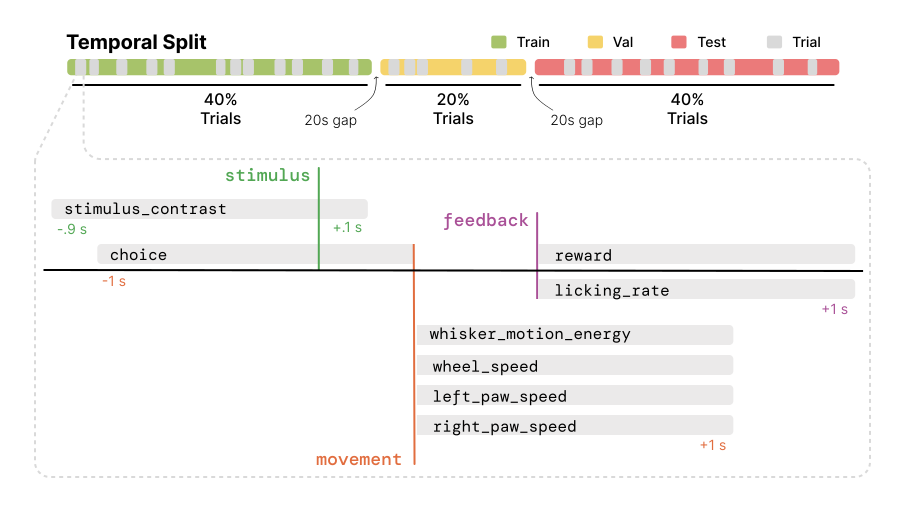
Evaluation runs on animals unseen during training using a causal 40/20/40 temporal split.
Note
TS1 is defined on the all_units build, with no unit quality filtering, and
every reported TS1 baseline uses it. A filtered build still runs, and the loader
only warns. Report the build with your results so the difference in setting is
clear. See Why two builds.
How to use the TS1 benchmark#
The TS1 evaluation pipeline is standardized and can be used with any model. There are two ways to plug in:
Use the standard pipeline: implement
BaseModeland pass your model toTS1EvalTrainer(extending it if needed). Training, checkpointing, and testing are all handled for you.Bring your own Trainer: write your own training loop, but inherit from
TS1TestMixinso testing stays standardized. This is required either way.
Key classes#
IBLBrainWideBenchTS1: dataset for a single session and task.BaseModel: model interface used by the standard pipeline.TS1TestMixin: mixin implementing standardized testing. Required for any Trainer.TS1EvalTrainer: standard Trainer, extendsTS1TestMixin.
Get a list of supported tasks#
Use get_ts1_supported_tasks() to see all available task names.
from ts1 import IBLBrainWideBenchTS1

tasks = IBLBrainWideBenchTS1.get_ts1_supported_tasks()
# ['choice', 'reward', 'stimulus_contrast', 'whisker_motion_energy',
#  'wheel_speed', 'right_paw_speed', 'left_paw_speed', 'licking_rate']
Pass target_resolution to keep only the tasks with a given target resolution.
from ibl_bwb_eval.tasks import TargetResolution

tasks = IBLBrainWideBenchTS1.get_ts1_supported_tasks(TargetResolution.SEQUENCE)
# ['choice', 'reward', 'stimulus_contrast']
Loading splits for a specific task#
Construct IBLBrainWideBenchTS1 directly to get the train/val/test split for one task and session.
from ts1 import IBLBrainWideBenchTS1

train_dataset = IBLBrainWideBenchTS1(
    root="/path/to/data",
    split="train",
    task="wheel_speed",
    recording_id="<session_id>",
)
How do I evaluate my pretrained model on TS1?#
Given a pretrained model, evaluating on TS1 includes any necessary adaptations, followed by standardized testing. Below we detail the steps for different use cases.
Model-level interface#
If you pretrained in this repo, the model is already a BaseModel
subclass under src/pretrain/models/<model>/ (Pretraining). TS1
finetunes that same class, where it is, so adapting it means adding the methods
pretraining never called.
A model pretrained outside the repo should implement the same interface, from wherever it lives, to work with the Trainer infrastructure below. You are free to write your own model and training interfaces instead, as long as testing stays standardized (Standardized testing).
Either way, make sure the model exposes the interface below:
from core.model import BaseModel

class MyModel(BaseModel):
    def input_fn(self, data): ...                       # data -> model inputs
    def configure_readout(self, readout_spec): ...       # attach a task head
    def link_datasets(self, train, val, test=None): ...  # optional, e.g. build a vocab
    def load_ckpt(self, ckpt): ...                        # optional, load pretrained weights
Your model produces inputs, not targets. input_fn builds the X half
(How a sample reaches the model); the dataset builds the target and the trainer receives
it as y, a dict holding what the task needs:
values, always.timestamps, on the five timestep-level tasks.mask, only onleft_paw_speedandright_paw_speed, where it carries the pose confidence that gates the loss.trial_id, when the task’s interval carries one.
So a loss override reads y["values"] and honours y["mask"], exactly as
TS1EvalTrainer does. With a Trainer of your own, both sides are yours to
shape.
Using the standard TS1 Trainer#
We provide a standard Trainer for TS1, TS1EvalTrainer. Point a Hydra
config’s model at your model and trainer at it:
model:
  _target_: my_package.MyModel
  # _target_: pretrain.models.my_model.MyModel  # a model pretrained in this repo
trainer:
  _target_: ts1.TS1EvalTrainer
This can be used out-of-the-box if your model does not require any special adaptations.
It handles data loading, training, checkpointing, and standardized testing automatically.
Which parameters train is set by finetuning.strategy: see Key config options.
Customizing the TS1 Trainer#
If you need to customize the Trainer, you can inherit from TS1EvalTrainer and
override individual methods (e.g. setup_model, link_model, predict) without
reimplementing the rest:
from ts1 import TS1EvalTrainer

class MyEvalTrainer(TS1EvalTrainer):
    def predict(self, X, target_timestamps, mask):
        return self.model(**X["model_inputs"], extra_arg=...)
Augmenting the training input#
TS1EvalTrainer composes the transforms named in train_transforms onto the dataset,
ahead of the model’s input_fn. The list is empty in src/ts1/configs/train.yaml;
set it in your trainer config to augment the sample before the model sees it:
train_transforms:
  - _target_: core.transforms.UnitDropout
    min_units: 0.6
val_transforms and test_transforms work the same way and are normally left empty.
Augmentation listed here cannot corrupt the target, which is taken from the sample before
these run: see How a sample reaches the model.
Standardized testing#
The standardized testing interface is implemented in the TS1TestMixin class.
This class handles loading the dataset, sampling intervals, and computing metrics.
Note that TS1EvalTrainer inherits from it already.
Inherit from it before BaseTrainer in any custom Trainer to get
setup_test_loader and test. Validation is deliberately left out of the mixin, so
setup_val_loader and val_epoch stay yours to define or override:
from core.trainer import BaseTrainer
from ts1 import TS1TestMixin

class MyEvalTrainer(TS1TestMixin, BaseTrainer):
    def predict(self, X, target_timestamps, mask):
        return self.model(**X["model_inputs"])
Warning
Every Trainer has to test through TS1TestMixin, whether it is
TS1EvalTrainer or one of your own. It fixes what a reported number
means: the test split, the sampling intervals, the metrics and the prediction file.
setup_test_loader and test are final for that reason, and the mixin
itself is not yours to edit. A number from a test loop of your own is not comparable
with the baselines.
Launching training and evaluation#
The entry point is src/ts1/train.py, driven by Hydra. One call trains
the model then automatically runs the standardized test protocol at the end:
python src/ts1/train.py trainer=linear task=<task> recording_id=<recording_id> \
    save_preds.enable=true save_preds.label=<submission-id>
save_preds writes the prediction file the leaderboard scores, one per
run at <label>/ts1-<task>/<recording_id>/seed_<seed>.safetensors under
BWB_PREDICTIONS_DIR from your .env (default
predictions/), so a submission is one run per task and session. Drop both flags
to train without writing predictions.
The above command defines general-purpose execution on TS1, including for single-session baselines.
To finetune a pretrained model, select its trainer and point ckpt.load_from at a checkpoint:
python src/ts1/train.py trainer=ndt_stitch_finetune task=<task> \
    recording_id=<recording_id> ckpt.load_from=/path/to/ckpt.pt \
    save_preds.enable=true save_preds.label=<submission-id>
Key config options#
Defaults live in src/ts1/configs/train.yaml, and a trainer config overrides what it
needs. Two are worth setting deliberately: which parameters train, and when the run stops.
Which parameters train. finetuning.strategy is null by default, so all of them do.
Three strategies ship:
finetuning:
  enable: true
  strategy:
    _target_: core.finetuning.GradualUnfreezing
    unfrozen_prefixes: [unit_emb., session_emb.]
    unfreeze_at_epoch: 40
Probefreezes every parameter whose name starts with none ofunfrozen_prefixes.GradualUnfreezingdoes the same, then releases the rest atunfreeze_at_epoch.FullFinetuningtrains everything and takes no arguments.
Early stopping. Validation drives it:
val:
  every_n_epochs: 1     # how often validation runs
  patience: 20          # stop after this many validations without improvement
  start_patience: 100   # do not start counting down before this epoch
  minimize: false       # false keeps the highest score, true the lowest
Improvement is measured on the task’s primary metric, fixed by its readout spec rather than chosen.
Context length. context_length is the total sampled window in seconds
(preceding context plus the fixed 1s scored target), bounded by
MAX_CONTEXT_LENGTH (20.0). It is not declared in train.yaml, so it
defaults to 1.0 (the dataset’s own default) unless added on the CLI. Raising
it does not change which trials exist or what gets scored, only how much
history precedes each one. Most models are not written to consume the extra
history correctly; see Variable context before pointing one at a
longer window.
python src/ts1/train.py trainer=<trainer> task=<task> recording_id=<recording_id> \
    +context_length=5.0
Warning
base_lr reaches the optimizer as written, with none of the sqrt(batch_size)
scaling most pretraining trainers apply, so a base_lr
carried over from a pretraining config is not the same learning rate here.
Reference baselines#
The training runs behind these baselines are accessible on W&B, linked from each row below.
Pretrained#
Adapted from a checkpoint pretrained in src/pretrain, so each requires
ckpt.load_from (Released checkpoints).
Model |
Trainer config |
Trainer class |
W&B |
|---|---|---|---|
|

|
||
|
|
||
|
|
||
|
|
Pass a row’s Trainer config to reproduce that baseline, the same command each released result came from:
python src/ts1/train.py trainer=<trainer config> task=<task> \
    recording_id=<recording_id> ckpt.load_from=/path/to/ckpt.pt
Single session#
Fit on one session from scratch, no checkpoint needed.
Model |
Trainer config |
Trainer class |
W&B |
|---|---|---|---|
Linear |
|
|
|
MLP |
|
|
|
TCN |
|
|
|
GRU |
|
|
|
|
|
||
|
|
||
|
|
Same command to reproduce one of these, with no checkpoint to load:
python src/ts1/train.py trainer=<trainer config> task=<task> recording_id=<recording_id>