
Task Suite 2: Neural Activity Prediction#
TS2 evaluates neural activity prediction across time and neurons.
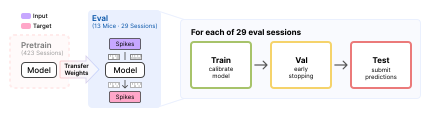
Overview of TS2#
Two tasks are included. Forecasting masks the last 10% of each context window and requires the model to predict future activity from past observations. Co-smoothing hides a fixed 10% of neurons per session and requires the model to reconstruct their activity from the remaining population. Both are scored with Poisson \(D^2\) as the primary metric, as well as bits-per-spike (bps).
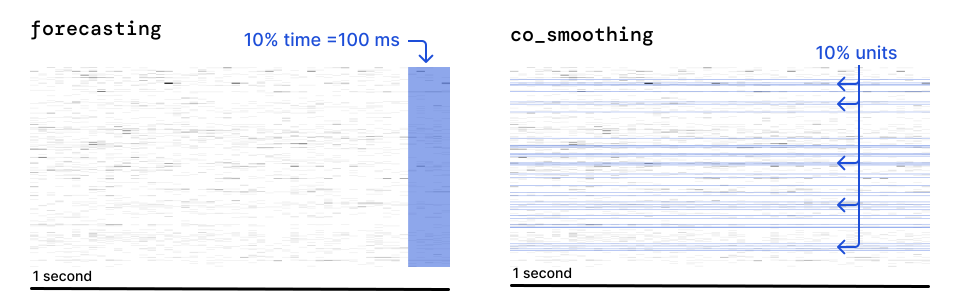
TS2 suite: co-smoothing (left) and forecasting (right) neural activity prediction targets.#
Evaluation pipeline#
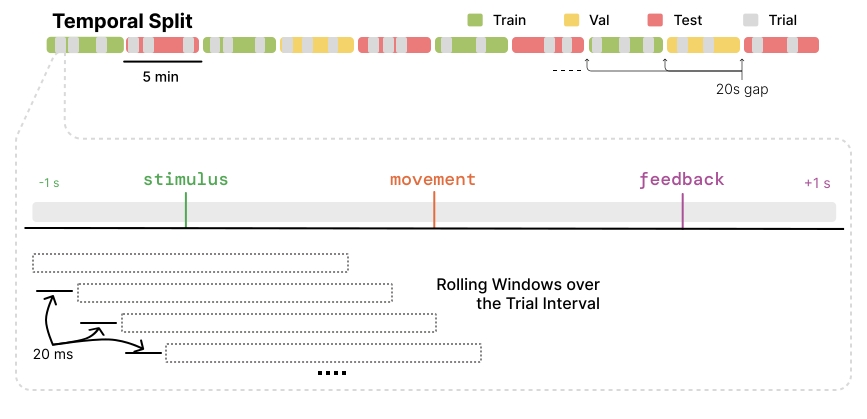
Splits are time-based, interleaving 5-minute blocks. Train sees every unit and the whole context window; val and test apply identical held-out procedures, so val metrics provide faithful proxies for test metrics.
Note
Held-out units (co-smoothing) or timestamps (forecasting) are fixed per
session and stripped from the input before input_fn runs. Val draws
from its own independent hold-out set, so tuning against val cannot
overfit test. Set val.mask_input=false only if your model cannot take
a corrupted input (e.g. a plain autoencoder).
Test windows are emitted at a stride of one bin, not one window, so a submission covers every bin-aligned window of the test split. The stride is fixed by the standardized test path.
How to use the TS2 benchmark#
The TS2 evaluation pipeline is standardized and can be used with any model. There are two ways to plug in:
Use the standard pipeline: implement
BaseModeland pass your model toTS2EvalTrainer(extending it if needed). Training, checkpointing, and testing are all handled for you.Bring your own Trainer: write your own training loop, but inherit from
TS2TestMixinso testing stays standardized. This is required either way.
Key classes#
IBLBrainWideBenchTS2: dataset for a single session and task.BaseModel: model interface used by the standard pipeline.TS2TestMixin: mixin implementing standardized testing. Required for any Trainer.TS2EvalTrainer: standard Trainer, extendsTS2TestMixin.
Get a list of supported tasks#
Use get_args on ibl_bwb_eval.tasks.TS2Task to see all available task names.
from typing import get_args

from ibl_bwb_eval.tasks import TS2Task

tasks = get_args(TS2Task)
# ('co_smoothing', 'forecasting')
Loading splits for a specific task#
Construct IBLBrainWideBenchTS2 directly to get the train/val/test split for one task and session.
from ts2 import IBLBrainWideBenchTS2

train_dataset = IBLBrainWideBenchTS2(
    root="/path/to/data",
    split="train",
    task="co_smoothing",
    recording_id="<session_id>",
)
How do I evaluate my pretrained model on TS2?#
Given a pretrained model, evaluating on TS2 includes any necessary adaptations, followed by standardized testing. Below we detail the steps for different use cases.
Model-level interface#
If you pretrained in this repo, the model is already a BaseModel
subclass under src/pretrain/models/<model>/ (Pretraining). TS2
finetunes that same class, where it is, so adapting it means adding the methods
pretraining never called.
A model pretrained outside the repo should implement the same interface, from wherever it lives, to work with the Trainer infrastructure below. You are free to write your own model and training interfaces instead, as long as testing stays standardized (Standardized testing).
Either way, make sure the model exposes the interface below:
from core.model import BaseModel

class MyModel(BaseModel):
    def input_fn(self, data): ...                       # data -> model inputs (binned spikes)
    def link_datasets(self, train, val, test=None): ...  # optional, e.g. build a vocab
    def load_ckpt(self, ckpt): ...                        # optional, load pretrained weights
    def forward(self, spikes): ...                        # log-rates, shape (B, T, N)
Note
Unlike TS1, TS2 has no per-task readout head to configure: the model always predicts log-rates for every neuron, and held-out positions are masked out of the loss/metrics rather than swapped for a different output. What the model has to handle is the axis the task predicts along: held-out units for co-smoothing, held-out timesteps for forecasting.
Using the standard TS2 Trainer#
We provide a standard Trainer for TS2, TS2EvalTrainer. Point a Hydra
config’s model at your model and trainer at it:
model:
  _target_: my_package.MyModel
  # _target_: pretrain.models.my_model.MyModel  # a model pretrained in this repo
trainer:
  _target_: ts2.TS2EvalTrainer
This can be used out-of-the-box if your model does not require any special adaptations.
It handles data loading, training, checkpointing, and standardized testing automatically.
Which parameters train is set by finetuning.strategy: see Key config options.
Customizing the TS2 Trainer#
If you need to customize the Trainer, you can inherit from TS2EvalTrainer and
override individual methods (e.g. setup_model, link_model, training_step) without
reimplementing the rest. Masking during training is the most common override:
from ts2 import TS2EvalTrainer

class MyEvalTrainer(TS2EvalTrainer):
    def training_step(self, X, y):
        X["model_inputs"]["spikes"], mask = self.masker(X["model_inputs"]["spikes"])
        loss = self.loss_fn(self.predict(X), y["values"])
        return loss[mask].mean() if mask.sum() != 0 else loss.sum() * 0.0
Augmenting the training input#
TS2EvalTrainer composes the transforms named in train_transforms onto the
dataset, ahead of the model’s input_fn. The list is empty in src/ts2/configs/train.yaml;
set it in your trainer config to augment the sample before the model sees it:
train_transforms:
  - _target_: core.transforms.UnitDropout
    min_units: 0.6
val_transforms and test_transforms work the same way and are normally left empty.
Augmentation listed here cannot corrupt the target, which is taken from the sample before
these run: see How a sample reaches the model. Note that the masked modeling models corrupt
the input in training_step instead, through their masker: hiding positions and
predicting them is their training objective.
Standardized testing#
The standardized testing interface is implemented in the TS2TestMixin class.
This class handles loading the dataset, applying the benchmark hold-out mask, and computing
Poisson \(D^2\) and bps. Note that TS2EvalTrainer inherits from it already.
Inherit from it before BaseTrainer in any custom Trainer to get
setup_test_loader and test. Validation is deliberately left out of the mixin, so
setup_val_loader and val_epoch stay yours to define or override:
from core.trainer import BaseTrainer
from ts2 import TS2TestMixin

class MyEvalTrainer(TS2TestMixin, BaseTrainer):
    def predict(self, X, mask=None, mask_timestamps=None, mask_units=None):
        return self.model(**X["model_inputs"])
Warning
Every Trainer has to test through TS2TestMixin, whether it is
TS2EvalTrainer or one of your own. It fixes what a reported number
means: the test split, the hold-out mask, the metrics and the prediction file.
setup_test_loader and test are final for that reason, and the mixin
itself is not yours to edit. A number from a test loop of your own is not comparable
with the baselines.
Launching training and evaluation#
The entry point is src/ts2/train.py, driven by Hydra. One call trains
the model then automatically runs the standardized test protocol at the end:
python src/ts2/train.py trainer=ndt recording_id=<recording_id> task=<task> \
    save_preds.enable=true save_preds.label=<submission-id>
save_preds writes the prediction file the leaderboard scores, one per
run at <label>/ts2-<task>/<recording_id>/seed_<seed>.safetensors under
BWB_PREDICTIONS_DIR from your .env (default
predictions/), so a submission is one run per task and session. Drop both flags
to train without writing predictions.
The above command defines general-purpose execution on TS2, including for single-session baselines.
To finetune a pretrained model, select its trainer and point ckpt.load_from at a checkpoint:
python src/ts2/train.py trainer=mtm_finetune recording_id=<recording_id> task=<task> \
    ckpt.load_from=/path/to/ckpt.pt \
    save_preds.enable=true save_preds.label=<submission-id>
Key config options#
Defaults live in src/ts2/configs/train.yaml, and a trainer config overrides what it
needs. Two are worth setting deliberately: which parameters train, and when the run stops.
Which parameters train. finetuning.strategy is null by default, so all of them do.
Three strategies ship:
finetuning:
  enable: true
  strategy:
    _target_: core.finetuning.GradualUnfreezing
    unfrozen_prefixes: [unit_emb., session_emb.]
    unfreeze_at_epoch: 40
Probefreezes every parameter whose name starts with none ofunfrozen_prefixes.GradualUnfreezingdoes the same, then releases the rest atunfreeze_at_epoch.FullFinetuningtrains everything and takes no arguments, and is what both shipped finetunes use.
Early stopping. Validation drives it:
val:
  every_n_epochs: 10    # how often validation runs
  patience: 20          # stop after this many validations without improvement
  start_patience: 100   # do not start counting down before this epoch
  minimize: false       # false keeps the highest score, true the lowest
Improvement is measured on Poisson \(D^2\), the primary metric for both tasks.
Context length. context_length is the total sampled window in seconds
(preceding context plus a fixed 1s trailing window), bounded by
MAX_CONTEXT_LENGTH (20.0). It is not declared in train.yaml, so it
defaults to 1.0 (the dataset’s own default) unless added on the CLI.
Raising it does not change which trials exist or what gets scored, only how
much history precedes each one: co_smoothing scores that whole trailing
second, forecasting only a fixed slice of it. Most models are not written
to consume the extra history correctly; see Variable context
before pointing one at a longer window.
python src/ts2/train.py trainer=<trainer> task=<task> recording_id=<recording_id> \
    +context_length=5.0
Warning
base_lr reaches the optimizer as written, with none of the sqrt(batch_size)
scaling most pretraining trainers apply, so a base_lr
carried over from a pretraining config is not the same learning rate here.
Reference baselines#
The training runs behind these baselines are accessible on W&B, linked from each row below.
Pretrained#
Adapted from a checkpoint pretrained in src/pretrain, so each requires
ckpt.load_from (Released checkpoints).
Model |
Trainer config |
Trainer class |
W&B |
|---|---|---|---|
|

|
||
|
|
Pass a row’s Trainer config to reproduce that baseline, the same command each released result came from:
python src/ts2/train.py trainer=<trainer config> recording_id=<recording_id> \
    task=<task> ckpt.load_from=/path/to/ckpt.pt
Single session#
Fit on one session from scratch, no checkpoint needed.
Model |
Trainer config |
Trainer class |
W&B |
|---|---|---|---|
Autoencoder MLP |
|
|
|
|
|
||
|
|
||
Population coupling |
|
|
|
Ridge AR |
|
|
|
Reduced-rank readout |
|
|
|
Reduced-rank readout + ISI |
|
|
|
Shrinkage |
|
|
|
Trailing mean |
|
|
Same command to reproduce one of these, with no checkpoint to load:
python src/ts2/train.py trainer=<trainer config> recording_id=<recording_id> task=<task>