
Pretraining#
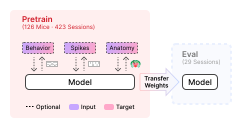
This guide walks through pretraining on the IBL BrainWideBench. The benchmark provides dataset classes, trainers, and Hydra configs for several reference models out-of-the-box. In addition, these resources are provided to help you design your own models and pretraining strategies. The output of pretraining is a checkpoint that is then loaded downstream for the evaluation pipeline.
Note
The benchmark places no requirements on what type of data or training objective you use for pretraining. The pretrain sessions provide spikes, behavioral signals, and anatomical labels. A key design decision is how to leverage, transform, and combine these modalities to learn representations that transfer well to evaluation.
Key concepts#
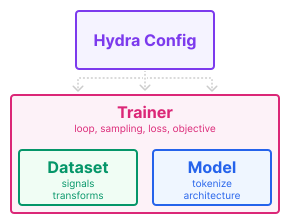
Pretraining is built from four components that can each be extended independently:
Trainer
Owns the training loop, sampling strategy, loss, and objective. Instantiates and connects Dataset and Model.
Dataset
Controls which signals are loaded for each session and how they are normalized and transformed.
Model
Defines the network architecture and the input_fn method that converts raw data into model inputs.
Config
Hydra configs wire the three components above together and control all hyperparameters.
How is the code organized?#
All pretraining code lives under src/pretrain/. The entry point is
train.py; everything else is organized into three subdirectories that map
directly onto the four components above:
src/pretrain/
├── train.py                        # entry point
├── configs/
│   └── train.yaml                  # base config (epochs, lr, batch size, ckpt, wandb, ...)
├── datasets/
│   ├── single_task_behavior.py     # IBLBrainWideBenchSingleTaskBehavior
│   ├── multi_task_behavior.py      # IBLBrainWideBenchMultiTaskBehavior
│   └── ...
└── models/
    └── <model>/                    # one directory per model (ndt_stitch, mtm, poyo, possm, ...)
        ├── <model>.py              # model class (subclass of BaseModel)
        ├── trainer/
        │   └── <model>_pretrain.py # trainer class (subclass of BaseTrainer)
        └── configs/
            ├── model/              # model architecture configs (e.g. ndt_stitch_10M.yaml)
            └── trainer/            # trainer configs (e.g. ndt_stitch_pretrain.yaml)
Two things follow from that layout:
Some datasets are already shared between models. Reuse one if it fits your objective:
IBLBrainWideBenchMaskModelingSpikes: binned spikes alone, used by MtM, NDT2 and NDT Stitch.IBLBrainWideBenchSingleTaskBehavior: spikes aligned to one behavioral target, used by POYO and POSSM.IBLBrainWideBenchMultiTaskBehavior: spikes aligned to several at once, used by POYO+ and POSSM.WholeSessionSpikeDataset: whole sessions after neural QC, for models reading unit features rather than a window of spikes. NEMO reads it directly and NuCLR subclasses it.
If none fits, design your own by subclassing
IBLBrainWideBench2026, which all four extend.Each model is self-contained. Model class, trainer, and Hydra configs all live in one directory. This is intentional: adding your own model means creating a new directory with the same layout, without having to touch any central code. A minimal template to copy from is available at
src/pretrain/models/my_model/.
Note
Hydra config discovery is handled by src/hydra_plugins/model_config_discovery.py,
which scans every subdirectory of pretrain/models/ for a configs/ folder and
registers as additional search paths. This means any configs/model/ or
configs/trainer/ directory inside your model package is treated exactly as if it
lived in the central src/pretrain/configs/ directory, and its configs are
immediately available as command-line overrides alongside the built-in ones.
For a full walkthrough of how to implement your own model, trainer, and
configs, see What should I implement? below. For the complete list of Hydra config
options, see Key config options, and Configuring .env for how a .env value
reaches one.
The responsibilities of each component, and the order a sample passes through on its way to the model, are laid out in Codebase overview.
What should I implement?#
The table below orders use cases from simplest to most complex. The first thing to touch is almost always the Model, it is self-contained and does not require changing the data pipeline. Dataset and Trainer modifications are more involved because they affect how data is loaded, sampled, and supervised.
Goal |
Model |
Trainer |
Dataset |
|---|---|---|---|
Run an existing model as-is |
Reuse |
Reuse |
Reuse |
Add a new architecture |
Implement |
Implement |
Reuse |
New architecture with custom signals |
Implement |
Implement |
Subclass |
Run an existing model as-is#
Pick a trainer config and run. Set the environment up first and the data root: see Configuring .env and Setting the data root.
None of the commands in this guide pass a data root, they read it from the environment.
Add data_root= to point a single run somewhere else.
The following runs NDT pretraining on all pretrain sessions with default hyperparameters:
python src/pretrain/train.py trainer=ndt_stitch_pretrain
Launching training covers the other overrides, from model size to the sessions a run reads. Reference baselines lists the trainer config for every model that ships with the benchmark.
Add a new architecture#
The easiest case, with no data pipeline changes needed.
Copy
src/pretrain/models/my_model/as a starting point.Implement your model on
BaseModel(the model interface used by the standard pipeline).Implement a trainer that instantiates it on
BaseTrainer(the training loop every model’s trainer is built on).
Both interfaces document what each method is handed and when the run calls it:
import torch.nn as nn
from core.model import BaseModel

class MyModel(BaseModel):
    def __init__(self, dim: int):
        super().__init__()
        self.net = nn.Linear(dim, dim)

    def input_fn(self, data):
        # convert a Data slice into a dict of tensors
        return {"model_inputs": {"x": ...}}

    def forward(self, x):
        return self.net(x)
from torch.utils.data import DataLoader

from core.trainer import BaseTrainer
from pretrain.datasets import IBLBrainWideBenchMaskModelingSpikes

class MyModelPretrain(BaseTrainer):
    def setup(self, ckpt):
        self.setup_train_loader()
        self.setup_val_loader()
        self.model = MyModel(self.cfg.model.dim)
        self.model.link_datasets(
            self.train_loader.dataset,
            self.val_loader.dataset,
        )
        self.model.to(self.device)
        self.setup_optimizers(ckpt)

    def setup_train_loader(self):
        # one of the shared datasets, see the next section for the others
        self.train_dataset = IBLBrainWideBenchMaskModelingSpikes(
            root=self.cfg.data_root,
            recording_ids=self.cfg.recording_ids,
            split="train",
        )
        self.train_loader = DataLoader(self.train_dataset)

    def train_epoch(self):
        for batch in self.train_loader:
            ...
            # yours to increment: the base only checkpoints and restores it
            self.train_step += 1

    def val_epoch(self):
        metrics = ...
        # save_if_best keeps the best weights, step_patience turns that into the
        # early-stop verdict train breaks on
        improved = self.save_if_best(metrics["loss"], metrics=metrics)
        # best_metrics carries best/val/avg, the key tuning and sweeps select on
        self.return_value = metrics | self.best_metrics
        return self.step_patience(improved)
setup_val_loader and setup_optimizers are yours to write in the same way, and the
template has both. Of everything above, only setup(),
train_epoch and val_epoch are called by the run itself. In exchange the base handles
logging, checkpointing and DDP, and offers get_param_groups and
clip_and_log_grad_norm for the optimizer and the backward pass.
Finally the two Hydra configs, which the discovery plugin picks up from your own directory without touching anything central:
# @package _global_

model:
  _target_: pretrain.models.my_model.MyModel
  dim: 256
# @package _global_
defaults:
  - override /model: my_model  # the model config above, by file name
  - _self_

trainer:
  _target_: pretrain.models.my_model.MyModelPretrain

num_epochs: 100
What the trainer loads is the one choice left, and one of the shared datasets usually covers it.
Which dataset class should I use?#
The dataset class controls what signals are available during training, and so what the trainer can supervise on. One of the shared ones usually fits:
Spike-only (IBLBrainWideBenchMaskModelingSpikes)
Binned spike counts, no behavioral signal attached. Used by MtM, NDT2 and NDT Stitch. The objective is left entirely to the trainer, masked spike prediction for instance.
Single-task behavior (IBLBrainWideBenchSingleTaskBehavior)
Spikes alongside one behavioral signal, chosen at config time with
task. The signal is normalized for you: z-scored for pixel-valued signals such as whisker and paw speed, binned for licking rate, left raw for wheel speed. Used by POYO and POSSM single-task.task: wheel_speed # one of the supported TS1 tasks
Multi-task behavior (IBLBrainWideBenchMultiTaskBehavior)
Spikes alongside several behavioral signals at once. Used by POYO+ and POSSM multi-task. The
tasksfield takes any of the supported TS1 tasks, and left null it takes all of them.tasks: - wheel_speed - whisker_motion_energy - choice
Unit-level (WholeSessionSpikeDataset)
Whole sessions after neural QC, for models reading unit features rather than a window of spikes. NEMO reads it directly and NuCLR subclasses it.
Every dataset in this list accepts a
context_length(see Variable context), but it is inert unless a trainer chooses to use it. NuCLR’s does: it passes its own window duration (views.duration) ascontext_lengthwhen building the dataset, and reads it back ascontext_windowfor the sampler, rather than keeping a separate, unvalidated copy of the same number.
If none of them carries the signal you need, write your own and carry on at New architecture with custom signals. Datasets and trainers are not coupled: any trainer can instantiate any dataset, and what supervises the model is whatever the trainer reads from the batch.
New architecture with custom signals#
The most involved case, since it touches the data pipeline. Start from the same
src/pretrain/models/my_model/ template as Add a new architecture, then subclass
the shared dataset that carries the closest signal and override dataset_transform
to add or modify your own:
from pretrain.datasets import IBLBrainWideBenchSingleTaskBehavior

class MyDataset(IBLBrainWideBenchSingleTaskBehavior):
    def dataset_transform(self, data):
        data = super().dataset_transform(data)
        # add or modify signals on data here
        return data
dataset_transform runs per sample, before any augmentation and before the model’s
input_fn, so whatever it writes onto data is there for input_fn to read into
the batch: see How a sample reaches the model. The trainer loads that dataset and
supervises on the signal:
from torch.utils.data import DataLoader

from core.trainer import BaseTrainer

from .my_dataset import MyDataset

class MyModelPretrain(BaseTrainer):
    def setup_train_loader(self):
        self.train_dataset = MyDataset(
            root=self.cfg.data_root,
            recording_ids=self.cfg.recording_ids,
            split="train",
            task=self.cfg.task,  # add `task: ???` to your trainer config
        )
        self.train_loader = DataLoader(self.train_dataset)

    def train_epoch(self):
        for batch in self.train_loader:
            # read your signal off the batch and compute the loss
            ...
Your trainer subclasses BaseTrainer, never another model’s
trainer: a training protocol is part of a model’s reported result, so tuning yours
must not be able to move an existing model’s numbers. To start from an existing loop,
copy it into your trainer and edit it there.
Launching training#
The entry point is src/pretrain/train.py, driven by
Hydra. The base config is
src/pretrain/configs/train.yaml; trainer-specific overrides live under
each model’s configs/trainer/ directory.
Select a trainer with the trainer override. Hydra composes the trainer
config on top of the base config:
python src/pretrain/train.py trainer=ndt_stitch_pretrain

# a trainer you added yourself, by the file name of its config
python src/pretrain/train.py trainer=my_model_pretrain
trainer=ndt_stitch_pretrain selects the NDT Stitch trainer config, which in turn pulls in
the ndt_stitch_10M model config by default. Training logs to WandB and saves a
checkpoint to ckpt/ when it finishes. To use a different model size:
python src/pretrain/train.py trainer=ndt_stitch_pretrain model=ndt_stitch_20M
For models that require a behavioral task (POYO, POSSM single):
python src/pretrain/train.py trainer=poyo_pretrain task=wheel_speed
To train on a subset of sessions, pass a list of recording IDs:
python src/pretrain/train.py trainer=ndt_stitch_pretrain "recording_ids=[session_id_1, session_id_2]"
The checkpoint directory and WandB project can be overridden inline:
python src/pretrain/train.py trainer=ndt_stitch_pretrain ckpt.dir=/my/ckpt/dir wandb.project=my-project
Key config options#
All options below can be overridden on the command line or in a config file.
Training
num_epochs: 100
batch_size: 32
base_lr: 1e-3          # most trainers scale it, see below
weight_decay: 1e-4
no_weight_decay: ["bias", "norm", "emb"]   # name fragments exempt from decay
precision: bf16        # bf16 | fp32
seed: 42
grad_clip: 1.0         # set to null to disable gradient clipping
grad_accum_steps: 1
Scaling the learning rate is each trainer’s own choice, not something
BaseTrainer does. Most set the scheduler’s max_lr to
base_lr * sqrt(batch_size); NuCLR and NEMO use base_lr as written, as the
evaluation suites do. Check yours before carrying a learning rate between models.
bf16 is the recommended precision for pretraining and the default every shipped
trainer runs at (RRR excepted). fp16 is advised against.
Checkpointing
ckpt:
  enable: true
  dir: ckpt/
  save_last: true       # always saves the final epoch
  every_n_epochs: null  # set to an int to also save intermediate checkpoints
  load_from: null       # path to a checkpoint to resume from
  resume: false         # if true, restores optimizer and scheduler state too
What skips weight decay#
BaseTrainer.get_param_groups exempts 1-D params and any name matching
no_weight_decay. The default catches every lookup table because they are all
named *_emb, and a lookup row is decayed every step but updated only when its
unit or session is in the batch. So name a lookup *_emb and a weight matrix
anything else (ndt_superv: spike_emb vs spike_proj). An override
replaces the list rather than extending it, so repeat the default
(rrr adds bs.).
WandB logging#
Set wandb.project and wandb.entity to route runs to your workspace.
Pass wandb.mode=disabled to run without logging:
python src/pretrain/train.py trainer=ndt_stitch_pretrain \
    wandb.project=my-project \
    wandb.entity=my-team
Multi-GPU (DDP)#
DDP is enabled automatically when multiple GPUs are detected. Set
ddp.force=true to run DDP on a single GPU (useful for debugging):
python src/pretrain/train.py trainer=ndt_stitch_pretrain ddp.force=true
Released checkpoints#
The checkpoint behind every model in the paper’s reported results is published on the Hugging Face Hub and the W&B run that wrote it is public too. The trainer config each one was produced with is in Reference baselines.
Model |
Size |
Hub |
W&B |
|---|---|---|---|
NDT Stitch |
519 MB |

|

|
MtM |
839 MB |
|
|
POYO+ |
1.9 GB |
|
|
POSSM |
1.9 GB |
|
|
NEMO |
128 MB |
|
|
NuCLR |
128 MB |
|
|
NuCLR and NEMO are pretrained over five seeds, every other model over one.
A checkpoint file is named after its model, <model>.pt for the single-seed repositories and
<model>_<seed>.pt for NuCLR and NEMO. curl needs nothing beyond the base
environment:
mkdir -p ckpt
curl -L https://huggingface.co/nerdslab/ibl-bwb-ndt_stitch/resolve/main/ndt_stitch.pt \
    -o ckpt/ndt_stitch.pt
huggingface_hub is not part of any install extra, but once added it does the same
with resumable downloads:
uv pip install huggingface_hub
hf download nerdslab/ibl-bwb-ndt_stitch ndt_stitch.pt --local-dir ckpt
Either way, a downstream trainer loads the file it left behind:
python src/ts2/train.py trainer=ndt_stitch_finetune task=co_smoothing \
    recording_id=<session_id> ckpt.load_from=$PWD/ckpt/ndt_stitch.pt
ckpt.load_from is tried as given first, then relative to ckpt.dir
(BWB_CKPT_DIR in your .env, default ./ckpt), so a
checkpoint downloaded under that directory can be passed as
ckpt.load_from=ndt_stitch.pt.
Every pretrained trainer config leaves ckpt.load_from mandatory
(???), so a run started without it fails at config resolution rather than
silently training from scratch.
Reference baselines#
Model |
Trainer config |
Dataset mode |
Trainer class |
W&B |
|---|---|---|---|---|
|
Spike-only |

|
||
|
Spike-only |
|
||
|
Multi-task |
|
||
|
Multi-task |
|
||
|
Unit-level |
|
||
|
Unit-level |
|
Pass a row’s Trainer config to reproduce that baseline, the same command each released checkpoint came from:
python src/pretrain/train.py trainer=<trainer config>